
Sydney’s train network covers 169 stations across nine suburban lines, carrying around 270 million passengers a year. Finding the right timetable is straightforward once you know where to look, but the network has enough complexity (branching lines, three separate weekly schedule types, overnight gaps) that it’s worth understanding how it all fits together. This page covers every practical tool and method for finding and using Sydney train timetables in 2026.
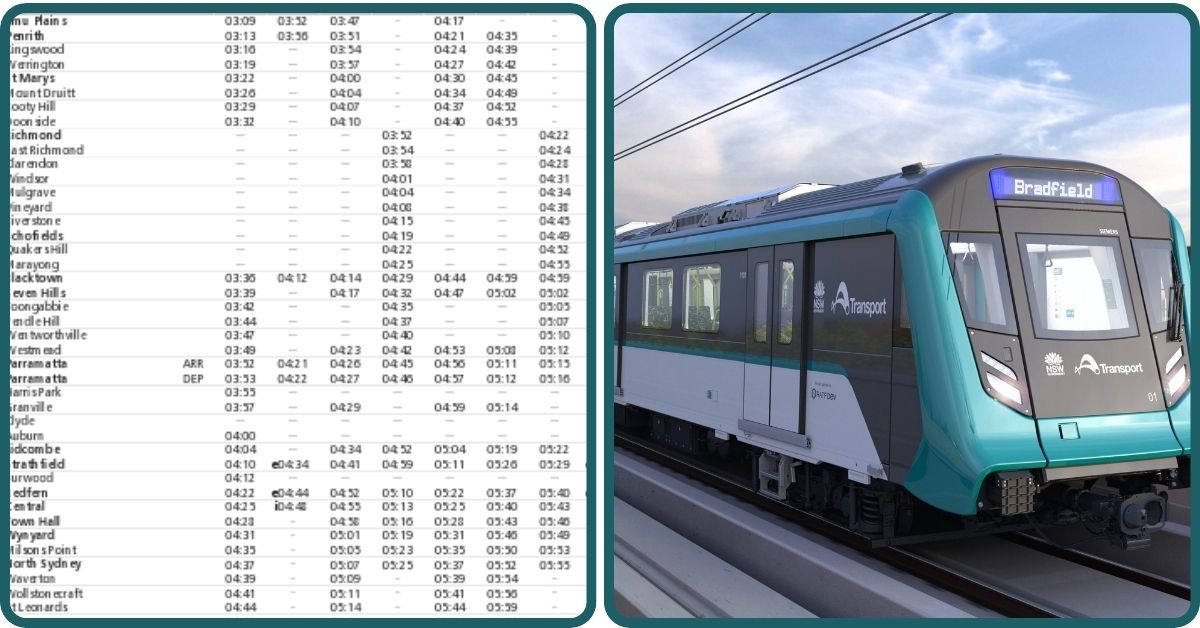
Where to Find Sydney Train Timetables in 2026
There are three main ways to access Sydney train timetables, each suited to a different need.
The Transport NSW Trip Planner at transportnsw.info/trip is the best tool for point-to-point journey planning. It incorporates live delay data and automatically adjusts results when services are disrupted. A refreshed version launched in 2026 with improved accessibility filters and clearer disruption alerts.
The official timetable pages at transportnsw.info/routes/train list every line from T1 to T9, plus Metro, Intercity, and Regional services. Each line page shows the route map, stop list, live departure boards, and a downloadable PDF timetable.
The Opal Travel app (iOS and Android) is the official Transport NSW app. It shows live departures, sends disruption alerts for your saved trips, and includes a hop-off reminder so you know when your station is coming up. The app also estimates your Opal fare for any planned trip.
For casual use, Google Maps integrates Transport NSW timetable data and works well for most journeys. Two third-party apps endorsed by Transport NSW, TripView and Moovit, are popular with daily commuters for their clean departure board interfaces. Find all endorsed apps at our Transport Apps guide.
How to Use the Transport NSW Trip Planner
Most people find it easiest to plan the night before, particularly for early morning travel when you want the platform confirmed in advance. Here is how to use it:
- Go to transportnsw.info/trip or open the Opal Travel app.
- Enter your destination first (station name, suburb, address, or landmark such as Sydney Opera House).
- Enter your origin, or tap “Use my location” to auto-fill your current position.
- Set your timing: choose Leave now, Leave at a specific time, or Arrive by a target arrival time.
- Review the results, which show route options, departure and arrival times, transfer details, walking legs, and real-time delay information.
- Use the filters to narrow by accessible services, fewer transfers, less walking, or specific modes.
- Save regular trips in the app for one-tap replanning on future days.
The Trip Planner accepts station names, stop codes, street addresses, suburbs, and landmarks. It also estimates your Opal fare for the planned journey.
Understanding How Sydney Train Timetables Are Structured
Sydney trains run on three distinct schedule types: Weekday, Saturday, and Sunday/Public Holiday. Each runs to different frequencies, so checking which day type applies is the first step when reading a timetable.
Weekday peak: 6:30am to 10:00am and 3:00pm to 7:00pm. On major inner-city lines, trains run every five to ten minutes. At City Circle stations (Town Hall, Central, Wynyard, Martin Place), multiple overlapping lines bring effective frequency down to two to three minutes.
Weekday off-peak: Before 6:30am, between 10:00am and 3:00pm, and after 7:00pm. Most stations see trains every 15 minutes. Outer and branch line stations may drop to 30 minutes between services.
Saturday: Broadly similar to weekday off-peak patterns, though slightly reduced on some lines.
Sunday and public holidays: The most reduced schedule, with some outer lines running every 30 minutes. Opal fares on Sundays are capped at $2.80 for the day, making Sundays the cheapest day to use the entire network.
One thing worth knowing early: most suburban lines branch outside the city centre, particularly T1, T2, T3, T4, and T9. The platform board showing the destination matters more than the line number alone. Plenty of travellers have learned this on the T1, where Richmond and Emu Plains services diverge at Blacktown, and the line number tells you nothing about which direction you are headed.
The T1 to T9 Lines at a Glance
Each line has its own timetable and stopping pattern. Here is a quick overview with links to the individual line pages for full detail.
- T1 North Shore and Western Line (Yellow): Richmond and Emu Plains west to the CBD, across the Harbour Bridge to Berowra. The network’s busiest line at peak, with trains every five minutes inner-city at peak.
- T2 Leppington and Inner West Line (Aqua): Leppington and Liverpool via Strathfield to the City Circle. Serves Newtown, Redfern, and Burwood.
- T3 Liverpool and Inner West Line (Orange): Liverpool via Regents Park and Strathfield to the City Circle. Note: the former T3 Bankstown route closed in October 2024 for conversion to Sydney Metro.
- T4 Eastern Suburbs and Illawarra Line (Blue): Cronulla and Waterfall south through Sydenham to the City Circle and Bondi Junction. The key line for Bondi Beach.
- T5 Cumberland Line (Purple): A cross-suburban western loop from Leppington to Schofields via Parramatta and Blacktown. No CBD services.
- T6 Lidcombe and Bankstown Line (Brown): Short connector between Lidcombe and Bankstown, becoming a key metro interchange when Sydney Metro Southwest opens later in 2026.
- T7 Olympic Park Line (Grey): Event shuttle from Lidcombe to Sydney Olympic Park. Limited regular services outside event days — always check the timetable before travelling.
- T8 Airport and South Line (Green): City to Domestic and International airport terminals, then south to Campbelltown. Note the Airport Station Access Fee charged on top of your Opal fare at airport stations.
- T9 Northern Line (Red): Hornsby to Epping, Strathfield, and the City. An alternative north corridor to T1, with different stopping patterns in peak. Always check the destination board.
For the Sydney Metro (M1), no printed timetable is needed. The metro runs every four minutes at peak and around five minutes inter-peak on weekdays, and operates 24 hours a day, seven days a week.
Checking for Delays and Disruptions in Real Time
Before any major trip, checking the alerts page is worth the 30 seconds it takes. Trackwork on Sundays is common and replacement buses take noticeably longer than the train.
- transportnsw.info/alerts: The primary source for live service alerts and planned trackwork, updated in real time.
- Opal Travel app: Pushes disruption alerts for your saved trips and sends hop-off reminders when your station is approaching.
- Trip Planner: Automatically reroutes around known disruptions when you search for a journey.
- @TrainsInfo on X (Twitter): Sydney Trains posts live service updates during disruptions and major events.
- Platform displays (PIDs): Show real-time departures, delays, and cancellations at every station.
Planned trackwork is published well in advance. The Future Trackwork Calendar at transport.nsw.gov.au covers upcoming work across the whole network and is downloadable as a PDF.
First Trains, Last Trains, and NightRide
Most suburban lines start running between 4:30am and 5:00am on weekdays, slightly later on weekends. Last trains from the CBD on most lines depart between about 11:30pm and midnight, depending on the line and direction.
From midnight to 4:30am, most suburban train services stop running. NightRide buses fill that gap, stopping at railway stations or on main roads nearby, with many services departing from near Town Hall Station. There are 14 NightRide routes covering the main train corridors. They run every 30 minutes on Saturday and Sunday mornings, and every 60 minutes on other nights.
NightRide is fine if you plan for it. The 30-minute frequency on Friday and Saturday nights is reasonable for overnight travel, and the routes map closely to the train corridors you would otherwise use.
The Sydney Metro M1 is the exception: it runs 24 hours a day, every day of the week, with no overnight gap and no replacement buses.
Timetable Changes in 2026: What Is Coming
Transport NSW adjusts timetables periodically, with major changes announced four to six weeks in advance via transportnsw.info/news.
The significant change to watch in 2026 is the Sydney Metro Southwest (Sydenham to Bankstown) extension, anticipated to open in September 2026. When it does, nine stations on the former T3 Bankstown corridor, including Campsie, Belmore, Lakemba, Wiley Park, and Punchbowl, will convert from Sydney Trains to Sydney Metro operations. Services will increase from 8 trains per hour at peak to 15. The T6 Lidcombe and Bankstown Line will become a key interchange at Bankstown.
During the conversion period, Southwest Link replacement buses operate between Sydenham and Bankstown. Check transportnsw.info/alerts for the latest if you travel those stations regularly.
Frequently Asked Questions
Where can I find Sydney train timetables?
The official source is transportnsw.info/routes/train, where you can view schedules for every line and download PDF timetables. For live journey planning with real-time delay information, use the Trip Planner at transportnsw.info/trip or the Opal Travel app.
How often do Sydney trains run?
At peak (6:30am to 10:00am and 3:00pm to 7:00pm weekdays), major inner-city stations see trains every five to ten minutes. City Circle stations have two to three minute effective frequencies due to overlapping lines. Off-peak, most stations have trains every 15 minutes. The Sydney Metro M1 runs every four minutes at peak. Outer and branch line stations may have 30-minute gaps off-peak.
What time does the last train run in Sydney?
Most suburban lines run their last trains from the CBD between about 11:30pm and midnight, depending on the line and direction. After midnight, NightRide buses replace train services on all suburban lines, operating until 4:30am. The Sydney Metro M1 runs 24 hours a day.
What are NightRide buses and when do they run?
NightRide buses replace most Sydney train services between midnight and 4:30am. There are 14 NightRide routes covering the main train corridors, with many departing from near Town Hall Station. They run every 30 minutes on Saturday and Sunday mornings, and every 60 minutes on other nights.
Do Sydney trains run the same timetable on weekends?
No. Sydney trains run three separate schedule types: weekday, Saturday, and Sunday/public holiday. Weekend services are less frequent, especially on Sundays and public holidays. Opal fares on Sundays are capped at $2.80 for unlimited travel across all modes.
What is changing on the Bankstown line in 2026?
The Sydney Metro Southwest extension from Sydenham to Bankstown is anticipated to open in September 2026. Nine stations including Campsie, Belmore, and Lakemba will convert to metro operations. Peak frequency increases from 8 trains per hour to 15. The T6 Lidcombe and Bankstown Line becomes a key interchange at Bankstown.
Can I download Sydney train timetables as a PDF?
Yes. Go to transportnsw.info/routes/train, select your line, and click to download the PDF timetable. Re-download after any announced timetable change. For day-to-day use, the Trip Planner is more practical as it includes real-time information.
How do I check for train delays and disruptions?
Check transportnsw.info/alerts for live service alerts and planned trackwork. The Opal Travel app sends push notifications for disruptions on saved trips. Sydney Trains posts live updates on X (Twitter) at @TrainsInfo. The Trip Planner automatically reroutes around known disruptions.
For a broader look at getting around Sydney by train, see our Sydney Trains hub, or explore the full Sydney Public Transport guide.